Spam and Scams – The Dangers in Your Inbox
Hi there. Welcome back to “Your Canadian Senior Moment”!
Last week, we learned the basics of finding your way around the internet and a little bit about email. Today, we’re going to dive into a very important topic: understanding spam and avoiding scams that may appear in your inbox. This is a critical skill for keeping yourself safe online.

What is Spam?
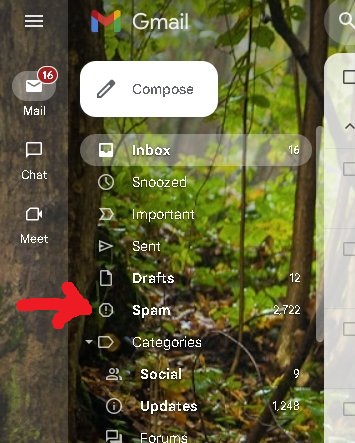
Spam, also called “junk mail,” is any unwanted or unsolicited email that fills up your inbox. It’s usually harmless but can be very annoying. Your email program, like Gmail or Yahoo, has a special folder to catch these messages. You can also manually mark an email as spam to help your email program learn
.
-
To mark a message as spam, click the email to open it, then look for a button that looks like a stop sign with an exclamation point inside, or simply says “Report spam.

“

Recognizing a Scam (Phishing Emails)
Scam emails, also known as phishing emails, are a far more serious type of junk mail. They are designed to trick you into giving away your personal information, like passwords, bank account numbers, or your social insurance number.
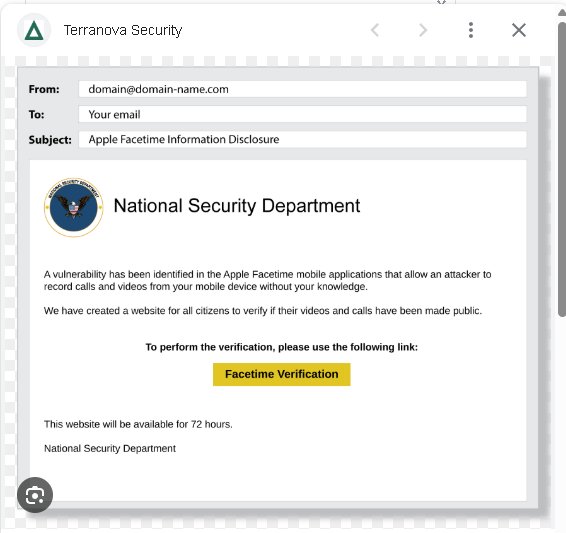
Here are the most common warning signs to watch for:
-
A Sense of Urgency: They often use phrases like “Your account will be suspended immediately!” or “Action required within 24 hours!” to make you act without thinking.
-
Requests for Personal Information: Legitimate companies will never ask for your password, social insurance number, or credit card details via email.
-
Suspicious Sender: The email address might look almost right, but with a small change (e.g.,
Amaz0n.cominstead ofAmazon.com). Or it might come from a random, unprofessional address. -
Spelling and Grammar Mistakes: Scammers are often not native English speakers, and their emails are full of typos and strange phrasing.
-
Odd-Looking Links: Hover your mouse over a link (don’t click!) and look at the address that appears in the corner of your screen. If it doesn’t match the company’s official website, it’s a scam.
What to Do if You Get a Suspicious Email
The rule is simple: Do not click anything!
-
Do Not Reply: Replying tells the scammer your email address is active.
-
Do Not Click Links: Even links that say “Unsubscribe” can lead you to a malicious website.
-
Do Not Open Attachments: They can contain viruses.
-
Delete the Email: The safest thing to do is to delete the email without opening it. If you’ve opened it, just close it and delete it. You can mark it as spam as well.
If you are concerned about an email from a company, go to their official website directly by typing the address into your browser. Do not use the link in the email.
Most email programs automatically place suspected junk mail into a separate spam or junk folder. It’s a good practice to check this folder every so often to make sure no important emails got caught by mistake, and then empty it completely. Don’t worry; it’s perfectly safe to delete everything inside!
Your Turn to Practice!
Look in your own spam or junk folder (if you have one). See if you can spot any of the red flags we discussed. Do not click anything! Just look for urgent language, spelling mistakes, or strange sender names.
What’s Next? In our next lesson, we will move on to the more positive side of the internet. We will learn how to send messages to family and friends with an important tool: the video call! We’ll show you how to connect with your loved ones face-to-face, no matter the distance. We’ll see you then!
(Please remember: Your device and screen may look slightly different from our examples. If you run into any difficulty, please describe any problem in the comments and we’ll do our best to help you individually.)
Warmly,
Bill and Marilyn
Founders of Canadian Senior Moment